

Add the Fernweh Charge plugin from ChatGPT's plugin directory, then ask about a place by name: "What does charging cost around Würzburg?" The answer comes back as a list and a map, with each station's ad-hoc price per kWh, its power, and how many charging points are free right now where the operator publishes that.
That's the whole trick. The rest of this page is the detail: how to add it, what to ask, what an answer holds, and where the numbers come from.
How do you add Fernweh Charge to ChatGPT?
Open the Fernweh Charge listing in ChatGPT's plugin directory while you're signed in to ChatGPT, and add it.
You need a ChatGPT account. You don't need a Fernweh account: the plugin has no sign-up and no sign-in.
Then choose Fernweh Charge for your question. In the screenshot further down, it shows as a small Fernweh Charge label in front of the question.
What should you ask?
Name a place, and say what matters to you. Three questions to start with:
- "Where can I charge fast near Würzburg right now?"
- "Is a CCS charger with at least 150 kW free near München Hauptbahnhof?"
- "What does charging cost around Würzburg?"
The plugin understands a radius, a minimum power, a connector type and "only stations with a free point", so you can put any of those in plain words. It can also sort by distance: "nearest first".
Name a place rather than asking about "my location". The plugin works from a place you name and never asks where you are.
What's in an answer?
Here is a real one, for the first question above:
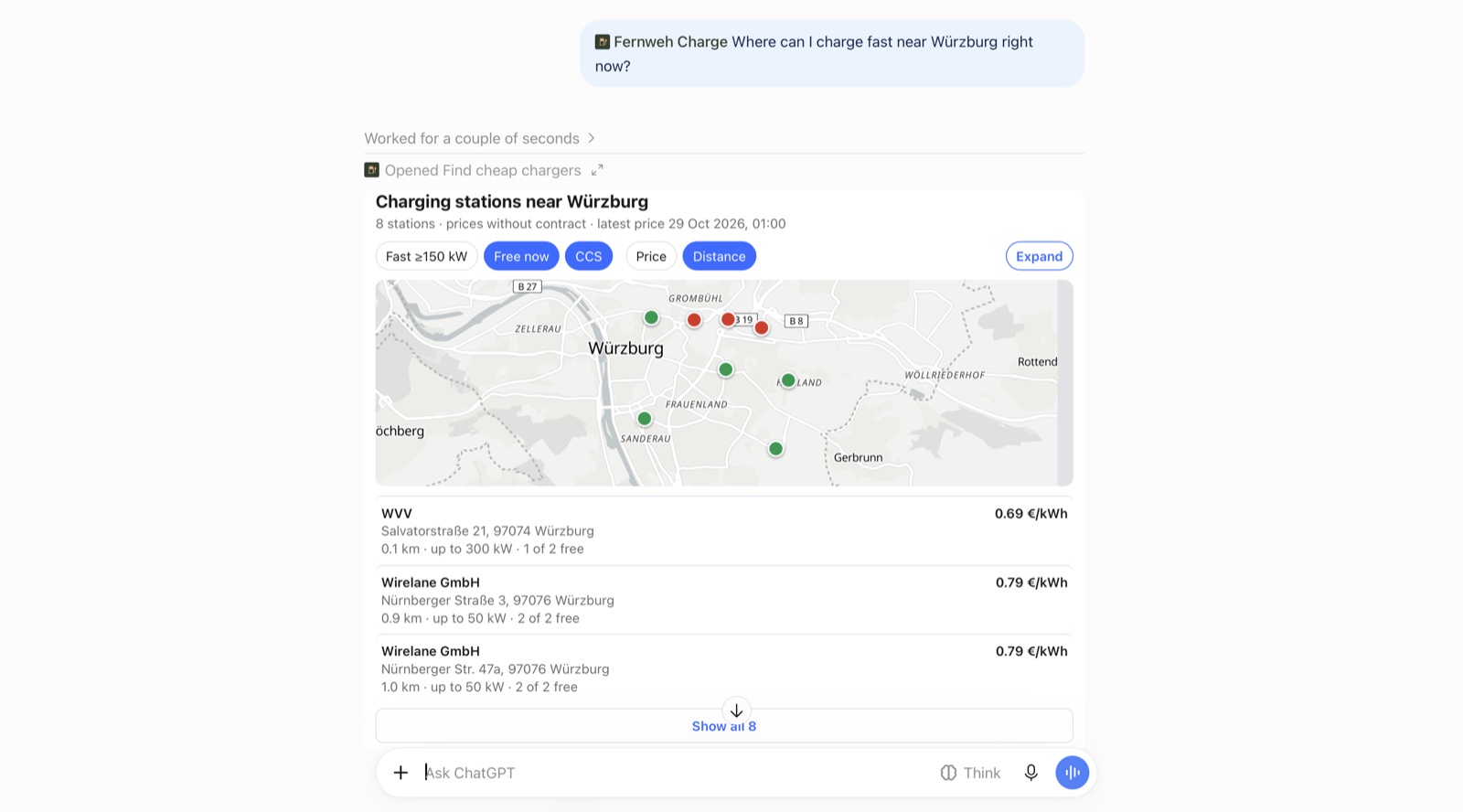
For each station, an answer can show:
- the ad-hoc price per kWh, the one you pay without a contract or an operator app
- the power, and the connector types
- the fees on top of the energy: session, time and blocking fees
- how many charging points are free right now, for German stations where the operator publishes it
The answer opens with a map. Its pins are coloured by price. Tap a station to open it in the Fernweh Charge app or to get directions in your maps app. The filter chips above the map, and "Search this area" after you move it, update the same map.
Ask about one station and you get every charging point there: its connector, its power and its live status, with its ad-hoc and contract prices.
What does charging cost across a whole area?
That's the third question, and it gets a different kind of answer: a price summary for the area. It says how many stations and operators there have a published price, gives the lowest, median and highest ad-hoc price per kWh, and lists each operator's lowest price.
It's the quickest way to find out whether 0.79 €/kWh is normal for a town or steep for it, before you choose a station.
Where do the prices come from?
From the charge point operators themselves. EU rules (AFIR) require operators to publish their prices as open data. In Germany they land on the Mobilithek, the federal open-data portal, under a CC0 licence. The plugin reads those feeds at least once a day.
A price in an answer is the last ad-hoc price the operator published. It isn't an offer, so check it at the charger. The answer says how fresh it is: the Würzburg one above reads "latest price 29 Oct 2026, 01:00".
If you charge on a contract or a roaming plan, your price comes from the plan, which is why the list leads with the ad-hoc price. What charging actually costs in Germany explains the difference.
What does the plugin learn about you?
Very little. It receives the coordinates of the place ChatGPT passes it, the place's name, the filters you asked for and, if you ask about one station, that station's ID. It never asks for your own location, keeps no searched places and sets no cookies. We count searches per day, per tool, without any personal data. Your conversation itself stays with OpenAI, under OpenAI's privacy policy. The details are in section 3 of the Fernweh Charge privacy policy.
What doesn't it do?
It doesn't start a charging session and it doesn't take payment: it only shows information. Ask about a place it has no data for and it says so, rather than making stations up.
And it doesn't promise the cheapest charger. It shows you the published prices and lets you choose.
The same prices on your iPhone
Fernweh Charge is also an iPhone app with the same data, and it needs no account either. When you're already in the car, it's the faster way to the same map. Fernweh Charge on the App Store.